
iPhone / iPad
For Gig Drivers
Mileage Tracker App for Gig Drivers
Track delivery routes, rideshare trips, fuel, expenses, receipts, and reports in one simple app.


Track unlimited trips for free. No credit card. iOS and Android.
Setup in ~2 minutesManual + automatic tracking
Prefer desktop reporting? See the web dashboard.Delivery routesFuel and tollsWeekly or monthly reports
Auto mileage | AI receipts | Fast exports
★★★★★ App Store feedback liveRated by early driversBuilt in Canada 🇨🇦Secure sync with Supabase encryption
On desktop? Scan to install.
Open your phone camera, scan, and install directly from the store.
Android
Gig Drivers
Built for drivers who work on the road
Gig drivers need simple records for daily driving, fuel costs, delivery routes, rideshare trips, parking, tolls, and expenses. Mileage Tracker Pro helps keep those records organized in one place.
Across platforms
Use one mileage log for delivery, rideshare, courier work, and other app-based driving.
Shift records
Keep daily mileage, fuel, parking, tolls, maintenance, and receipts easier to review.
Clean summaries
Create PDF or CSV reports when you need a clear summary of driving and expenses.
What you can track
Useful for gig work
Keep mileage, fuel, expense, receipt, and report records together so review is simpler when you need it.
Delivery driving
Rideshare driving
Courier work
Food delivery
Package delivery
Multiple app-based driving jobs
Daily mileage records
Weekly or monthly reports
Fuel, parking, tolls, and receipts
Free plan
Track unlimited trips for free
Mileage Tracker Pro lets you start with unlimited trip tracking for free. Log your driving activity without needing a manual spreadsheet or paper mileage book.
Expenses
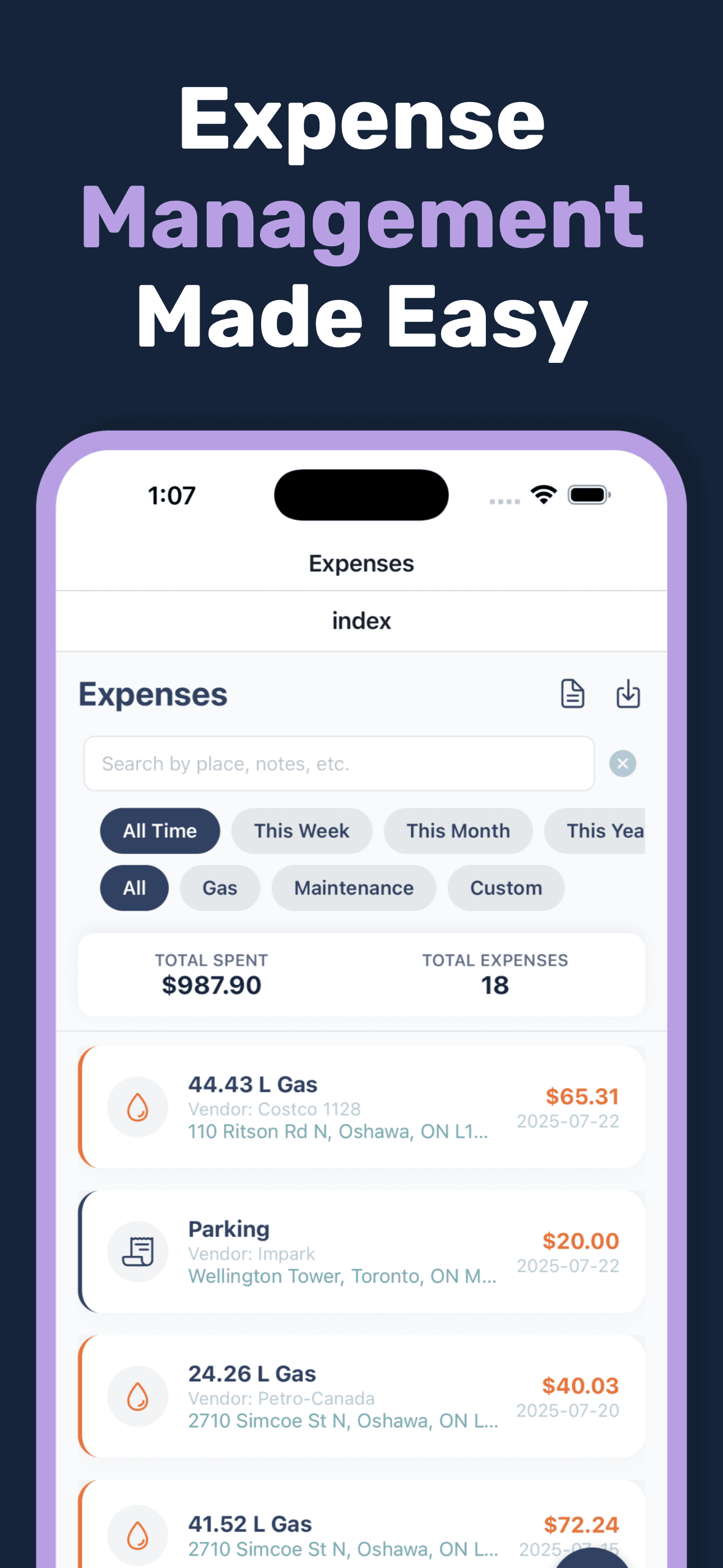
Track expenses alongside mileage
Add fuel, parking, tolls, meals, maintenance, and receipt records so your mileage and expenses are easier to review later.
Reports
Export reports
Create PDF or CSV reports when you need a clean summary of your driving and expenses.
Product proof for gig drivers
Real app screens that show route tracking, fuel and expense records, receipt organization, and exportable reports.
Section 1
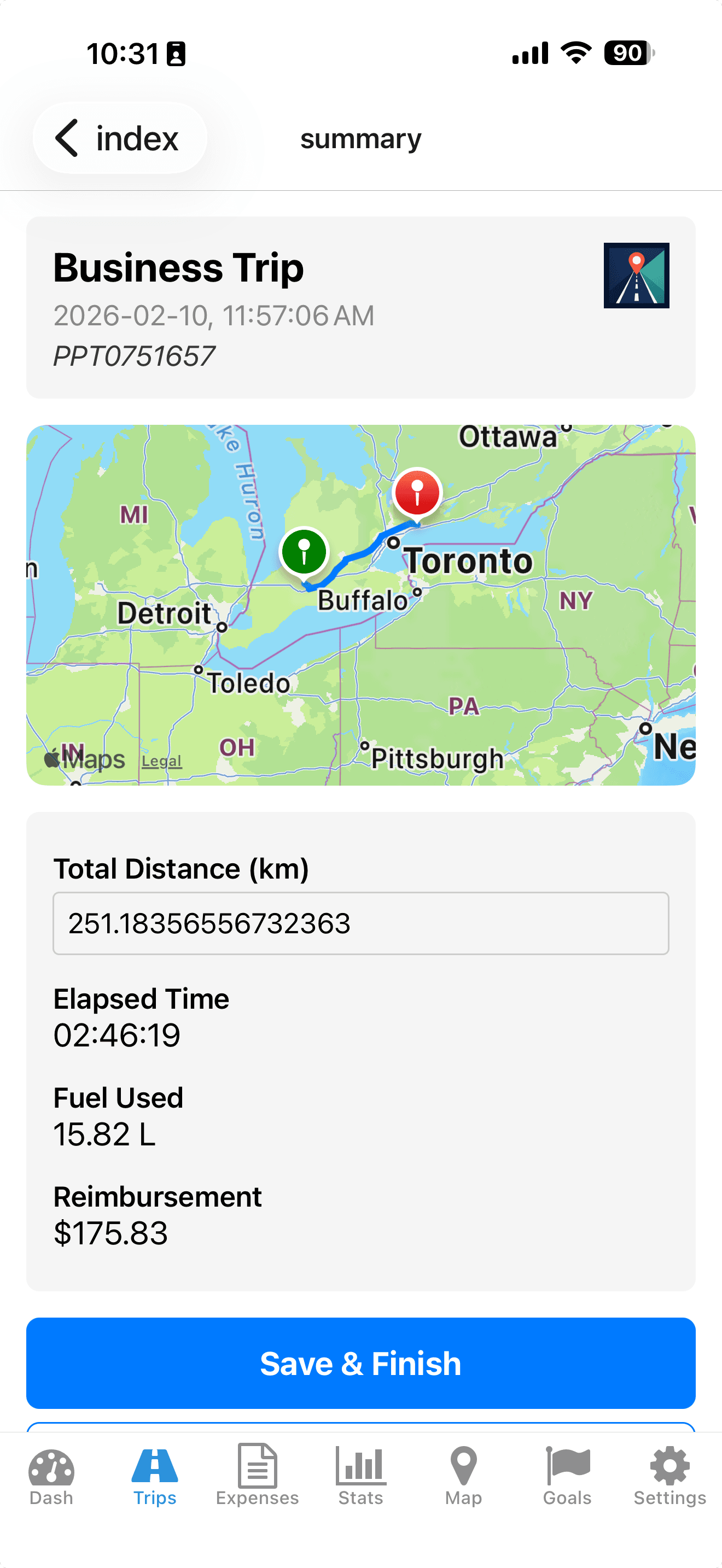
Track Every Trip Automatically
Automatic GPS tracking with precise route calculation.
See exact routes, distance, elapsed time, fuel used, and reimbursement in one view.
Section 2
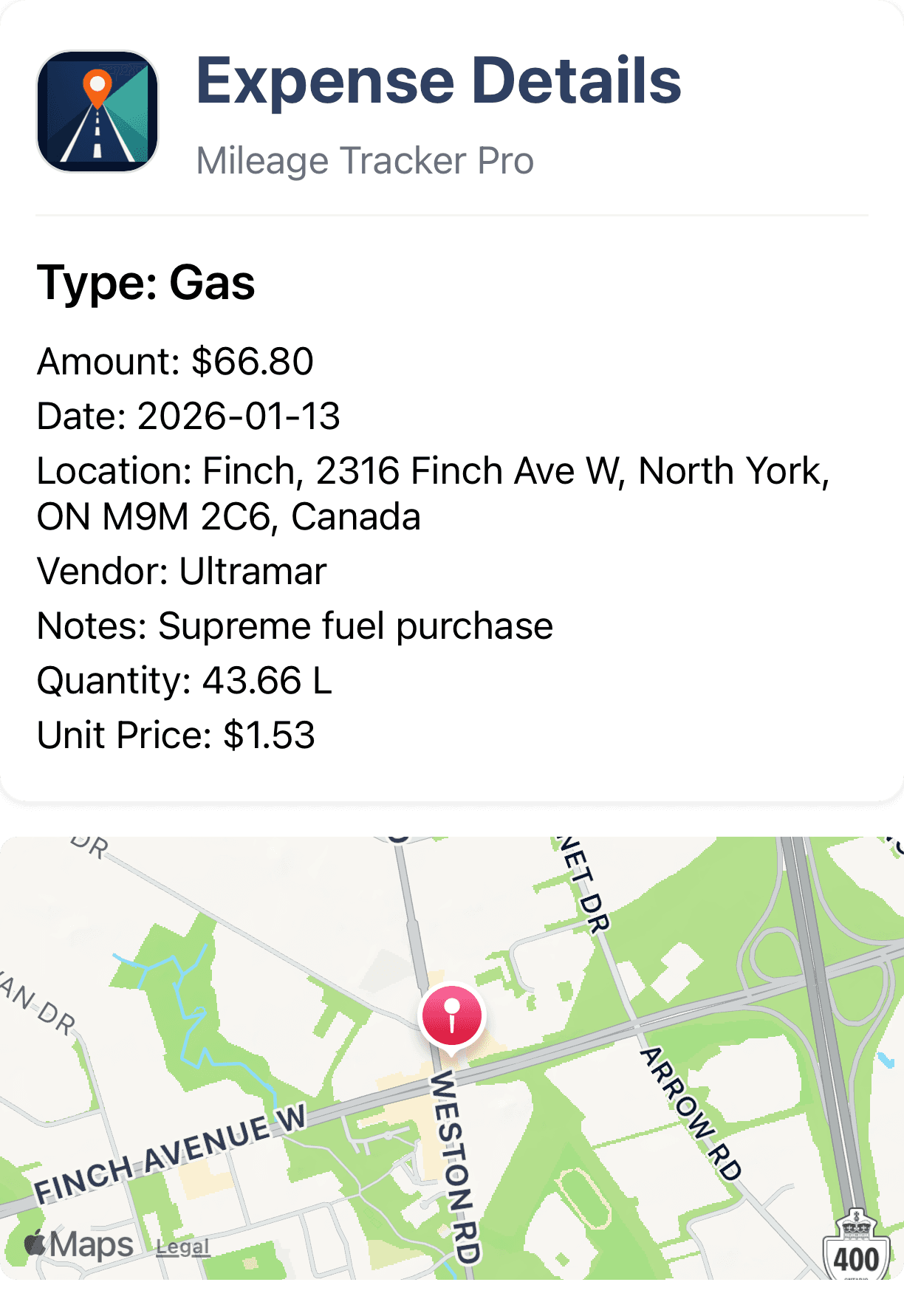
Log Expenses in Seconds
Capture expense details and attach location context immediately.
Track vendor, amount, quantity, and notes with a clear record tied to your trip history.
Section 3
Keep Records Ready for Review
Filter and export clean records for accounting and tax preparation.
Premium supports CSV and PDF exports so your accountant gets organized data without cleanup.
View sample PDF export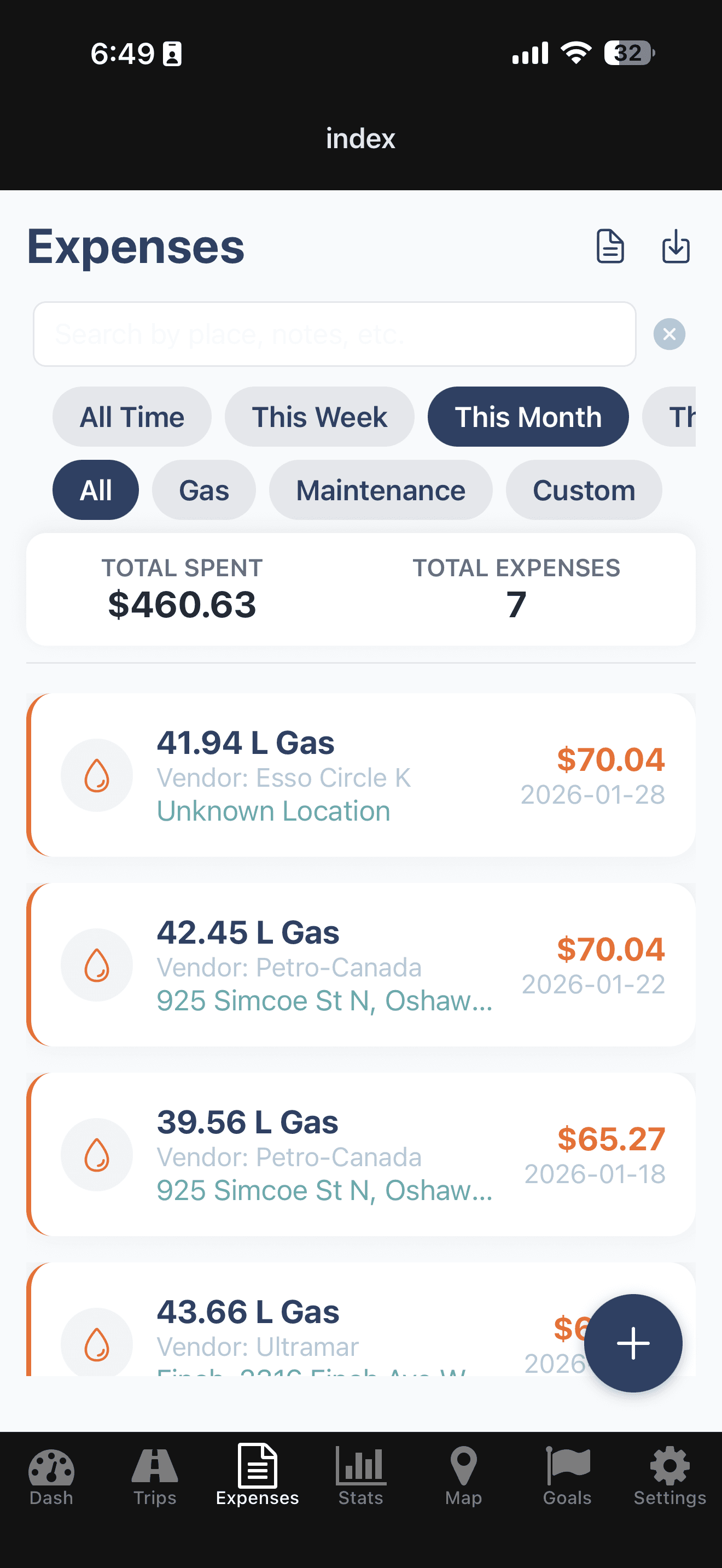
Section 4
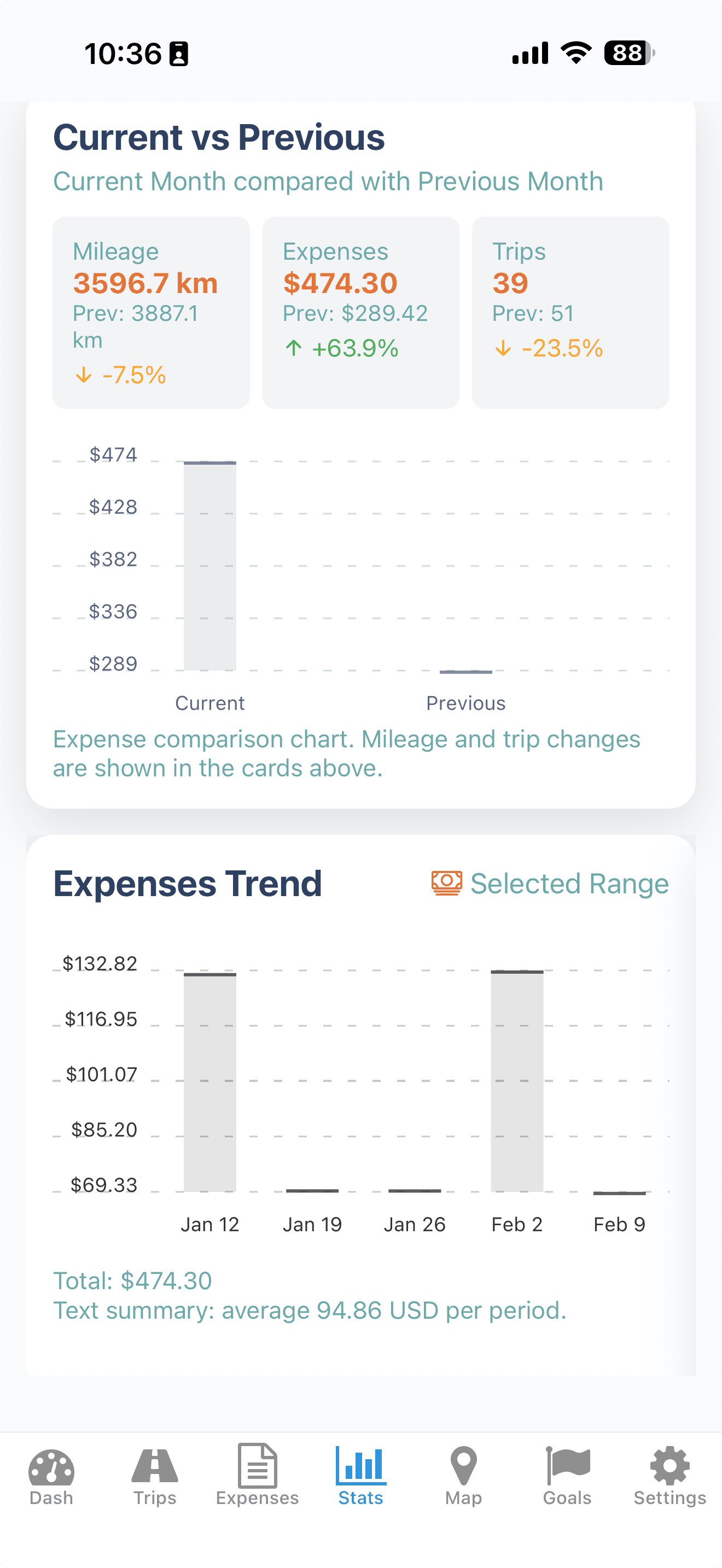
Understand Your Numbers
See clear monthly comparisons and trend data.
Review mileage, trips, and expenses side-by-side to spot cost changes quickly.
Track on your phone. Review on your computer.
Mileage Tracker Pro syncs trips and expenses to a secure web dashboard so gig drivers can review totals, categories, and reports from desktop.
- Review weekly and monthly summaries before payout review
- Useful for drivers working across multiple platforms
- Same account, same synced data, no manual transfers
Web Dashboard
Monthly Overview
Trips
128
Business km
1,942
Expenses
$487
Business vs Personal
Business 74%Personal 26%
Recent Trips
Client meeting - 24.6 kmSaved
Supply pickup - 13.2 kmSaved
Site visit - 31.4 kmSaved
FAQ
Can gig drivers use Mileage Tracker Pro for multiple apps?
Yes. You can use Mileage Tracker Pro to track driving for different gig platforms, delivery work, courier routes, rideshare trips, and other work-related driving.
Is trip tracking free?
Yes. Mileage Tracker Pro offers unlimited trip tracking for free.
Can I track fuel expenses?
Yes. You can log fuel and other expenses such as parking, tolls, meals, maintenance, and receipts.
Use cases
Explore more ways to use Mileage Tracker Pro
Download Mileage Tracker Pro and start free.
Start tracking unlimited trips for free. Mileage Tracker Pro is available on Google Play and the App Store for gig drivers.
Purchases are handled securely by Apple or Google. Cancel anytime.
Ready to install?
Open the right store automatically for your device.